Product Overview
AR-Powered Spatial Inspection Platform
Anchor defect markers directly on large industrial surfaces using AR
and register every finding to the exact composite layer, without disassembly.
Product
ROBOSCOPE
Version
1.x
Classification
Product Overview
Date
April 2026
Product Overview
Product Overview
ROBOSCOPE is a mobile-based spatial inspection platform built for large industrial parts. It replaces paper logs and manual measurement with AR-anchored defect markers positioned directly on the physical surface — capturing type, location, and dimensions in a single session. Designed for wind turbine blade QC and expanding to construction and marine applications.
Key characteristics
- AR spatial anchoring Defect markers placed and anchored on real surfaces using iPhone AR — approximately 5 cm placement accuracy.
- Single-session capture All defect data captured in one AR session: type, spatial coordinates, dimensions, and photographic evidence.
- iOS native Native iPhone application. No HoloLens or dedicated hardware required.
- Layup Registration Each AR-anchored defect is automatically mapped to the exact composite layers at that surface coordinate.
- ERP integration Session data syncs directly to client QC and ERP systems — no manual re-entry.
- ML defect detection On-device vision models for defect classification, severity grading, and circularity deviation measurement.
The Problem
Large-part quality control is labour-intensive and error-prone. A single wind turbine blade inspection can require hundreds of individual measurements, each recorded manually and later re-entered into an ERP system.
The conventional workflow results in:
- At least five manual measurements per defect (location, dimensions, distances along curved surfaces)
- Handwritten field forms that introduce transcription errors on re-entry
- No direct link between defect records and the composite structure at that point
- Ad-hoc escalation via email when an inspector encounters an ambiguous finding
Key pain points
- Measurement overhead — Each finding requires multiple independent measurements with tape, calipers, and coordinate notation.
- Re-entry errors — Transcribing field notes into ERP or QMS systems introduces inaccuracies at every handoff.
- No layer context — Field records capture location and dimension but not which composite plies are affected — requiring a secondary engineering analysis.
- Escalation friction — Unclear findings travel via email with photos rather than through a structured workflow.
AR Inspection
Inspectors carry an iPhone to the part. They open ROBOSCOPE, scan the work task router QR code to register the session, and begin placing AR markers directly on the surface.
Each marker captures:
- Spatial location — AR anchor coordinates relative to the part (~5 cm accuracy)
- Defect type — selected from a pre-configured classification list
- Dimensions — entered via guided prompts after initial placement
- Photographic evidence — automatic capture from every angle during placement
- Inspector ID and timestamp — bound to the session record
Workflow
- Open app, authenticate with credentials
- Scan work task router to register session and load part geometry
- Walk to each defect location and place an AR marker directly on the surface
- Complete dimension entry and defect classification for each marker
- Review session, escalate any flagged items if needed
- End session — ROBOSCOPE generates the defect record and syncs to ERP
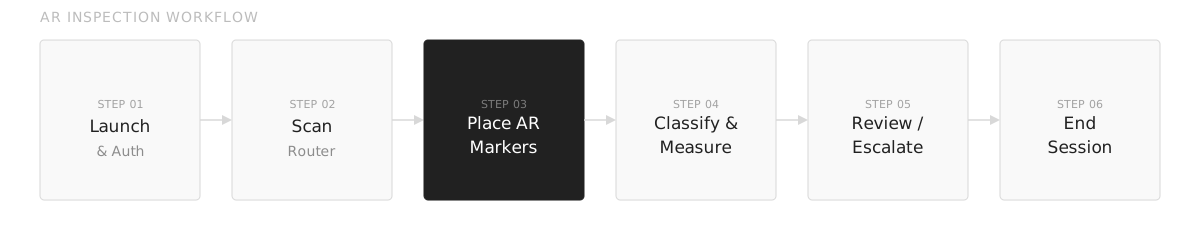 Figure 1 — AR inspection session workflow
AR system performance
| Metric | Value |
|---|---|
| Placement accuracy | ~5 cm on large surfaces |
| Supported surface types | Composite, painted metal, coated structures |
| Max session markers | Unlimited |
| Session sync | On Wi-Fi at session close or deferred |
| Platform | iOS (iPhone) |
Layup Registration Table
The Layup Registration Table (LRT) maps every AR-anchored defect to the exact composite layers at that point on the part geometry — giving engineers a full cross-section view without disassembly.
How it works
- Locate — AR anchor position is resolved against the part’s layup geometry to identify the zone
- Layer lookup — LRT returns the ordered stack of plies at that coordinate: material, orientation, and thickness per layer
- Depth assessment — Defect depth is cross-referenced with the layer stack to determine which plies are affected
- Severity grading — Each affected layer is graded individually; structural plies trigger automatic escalation
- Export — Full layer-annotated defect record exported to ERP or repair work order with ply-level detail
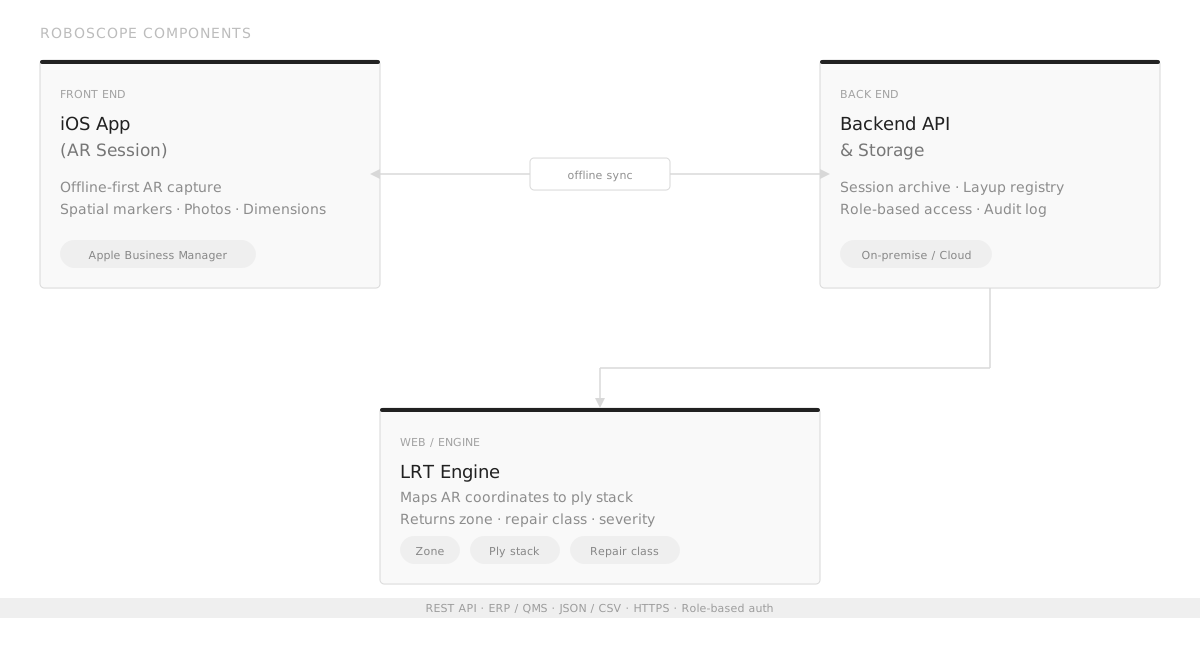 Figure 2 — Roboscope components and data flow
LRT data per defect
| Field | Description |
|---|---|
| Zone ID | Named layup zone resolved from AR anchor coordinates |
| Ply stack | Ordered list of plies with material, angle, and nominal thickness |
| Affected layers | Subset of plies intersecting the defect depth envelope |
| Repair class | Repair category derived from affected structural ply count |
ML Intelligence
ROBOSCOPE includes purpose-trained vision models covering the full defect spectrum for large industrial surfaces and wind turbine blades.
Models run on-device via CoreML, enabling offline operation in environments without reliable connectivity.
Model coverage
- Defect classification — identifies defect type from photographic evidence
- Severity grading — assigns a severity class based on visual characteristics
- Structural anomaly detection — flags features consistent with subsurface damage
- Paintwork issues — detects delamination, cracking, and coating failures
- Circularity deviation — quantifies how much a real curve deviates from its nominal geometry
- Edge case routing — escalates findings that fall outside model confidence thresholds to qualified engineers
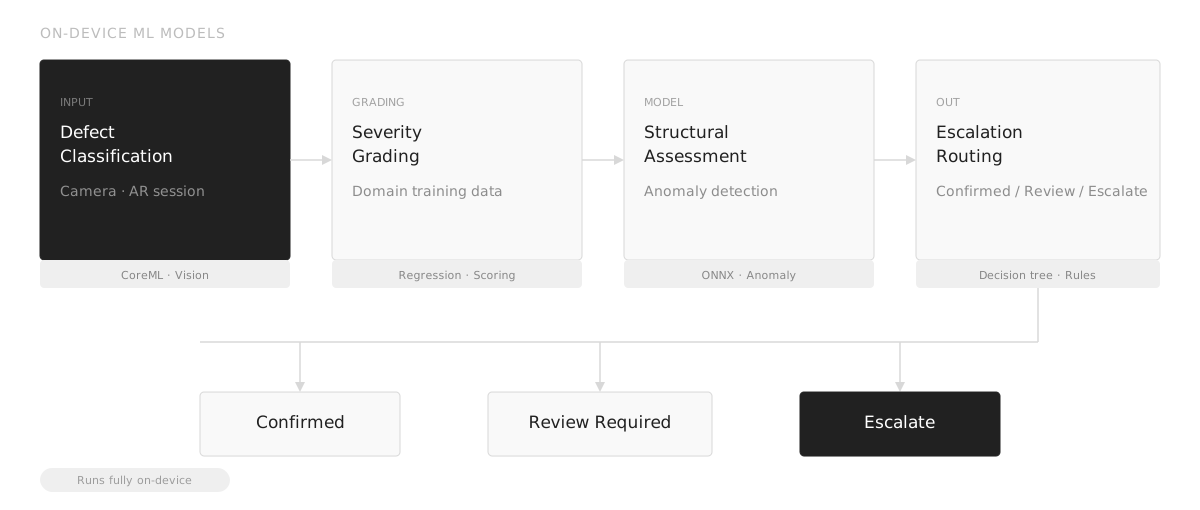 Figure 3 — On-device ML model pipeline
Training and updates
Models are trained on domain-specific data collected during active sessions and continually expanded as new failure modes are encountered. Updates are distributed as app updates through Apple Business Manager.
Platform
ROBOSCOPE is an iOS-native application designed for handheld use on the factory floor.
Deployment
| Component | Detail |
|---|---|
| Mobile app | iOS (iPhone) — native, offline-first |
| Device management | Apple Business Manager |
| Backend | On-premise Linux VM or Spiral-managed cloud |
| Integration | REST API — ERP, QMS, PLM, MES |
| Export formats | JSON, CSV, image packages with metadata |
Connectivity model
The application stores all session data locally on-device. Sync to the backend occurs when Wi-Fi is available — at session close or manually deferred. No inspection capability is lost in areas without connectivity.
Industries
Primary
- Wind turbine blade manufacturing — full blade surface inspection, leading edge assessment, structural anomaly detection
Expanding
- Construction — large concrete and steel structure assessment
- Marine and shipbuilding — hull coating and corrosion inspection
- Aerospace composites — large structural panel and fuselage section QC
Benefits
| Accurate | AR anchoring eliminates manual coordinate notation. Every defect is positioned at the physical location and recorded automatically. |
| Complete | A single AR session captures location, type, dimensions, and photographic evidence without tool switching. |
| Layer-aware | LRT links every surface defect to the exact composite ply stack at that point — without disassembly or secondary engineering analysis. |
| Direct | Session data flows from the inspector’s phone to the ERP record. No re-entry, no handwritten forms. |
| Escalation-ready | Edge cases and structural findings are automatically routed through a structured workflow instead of email chains. |
| Offline-capable | All capture and AI inference runs on-device. Inspections proceed in environments without Wi-Fi or cellular coverage. |
Next steps
Ready to deploy Roboscope on your inspection floor?
Get in touch to discuss your large-part inspection requirements and plan a pilot session.
Company Profile

Spiral Science and Technology Inc
Spiral is a computer vision and augmented reality company headquartered in Boston, Massachusetts. Alumni of the 2020 AFWERX U.S. Air Force technology accelerator powered by Techstars in Boston, Spiral develops mobile-based inspection systems for manufacturing.
The team operates across the United States, Europe, and India, serving customers in aerospace and defense, wind energy, industrial piping, and marine equipment manufacturing.
Contact
Kosta Shyshkin
Director Americas
k@spiral.technology k@spiral.technology +1 617 341-81-40 +1 617 341-81-40
Bhuvaneshwar BN
Solutions Engineer
bb@spiral.technology bb@spiral.technology +91 97393 40122 +91 97393 40122
Address
12 Channel Street, Boston MA 02210
SAM / UEID
X6W7RH56SJB3
CAGE
9DVV7
Selected Customers




All rights reserved 2018–2026