Product Overview
Automated Visual Inspection System
Verify component configuration, marking and assembly completeness in real time
using cameras your team already owns.
Product
INVENTOR
Version
3.0
Classification
Product Overview
Date
April 2026
Product Overview
INVENTOR is a mobile-based system for automating visual inspections on the shop floor. It verifies markings, labels, and text on individual parts, and confirms that assemblies are complete, correctly configured, and properly oriented. The system delivers a pass or fail result in real time and logs every inspection with full traceability.
Key characteristics
- Mobile-first Runs on iPhone and iPad. No fixed cameras, fixtures, or lighting rigs.
- Offline-first All detection and validation logic runs on-device with no internet dependency.
- Fast configuration New deployments operational within 1 week. New pass/fail scenarios can be live in as little as 30 minutes.
- Enterprise deployment Devices managed through Apple Business Manager for IT policy compliance.
- Backend flexibility On-premise installation, client-hosted cloud, or Spiral-managed cloud.
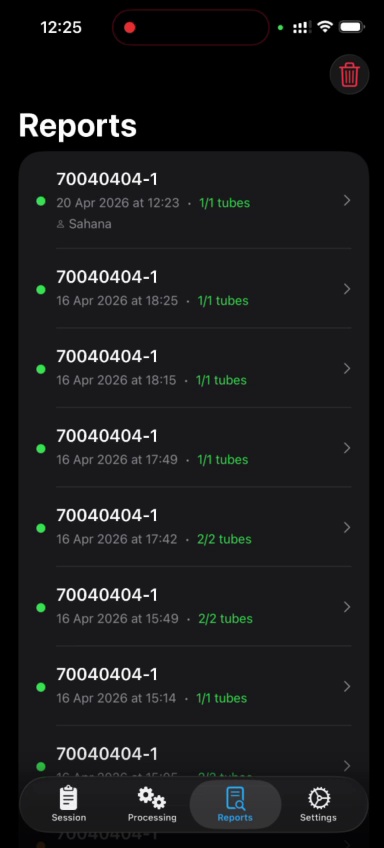
- Auto-documentation Every inspection timestamped and archived. Supports ISO 9001 and AS9100 compliance exports.
The Problem
High-mix, low-volume (HMLV) manufacturing pushes traditional quality systems to their limits. Each product run is short, each design is unique, and every changeover resets the inspection process.
Machine-vision systems built for high-volume lines require fixtures, lighting calibration, and algorithm tuning that can take weeks — often longer than the production window itself. Manual inspection fills the gap but suffers from inconsistency, fatigue, and incomplete records.
Key pain points
- Setup overhead — Configuring hardware and algorithms consumes valuable time before any inspection can begin.
- Inconsistent outcomes — Results vary by operator and shift, introducing variability at every changeover.
- Documentation burden — ISO 9001 and AS9100 require detailed traceability records that manual processes cannot reliably produce.
Use Case 1 — Marking and Labeling
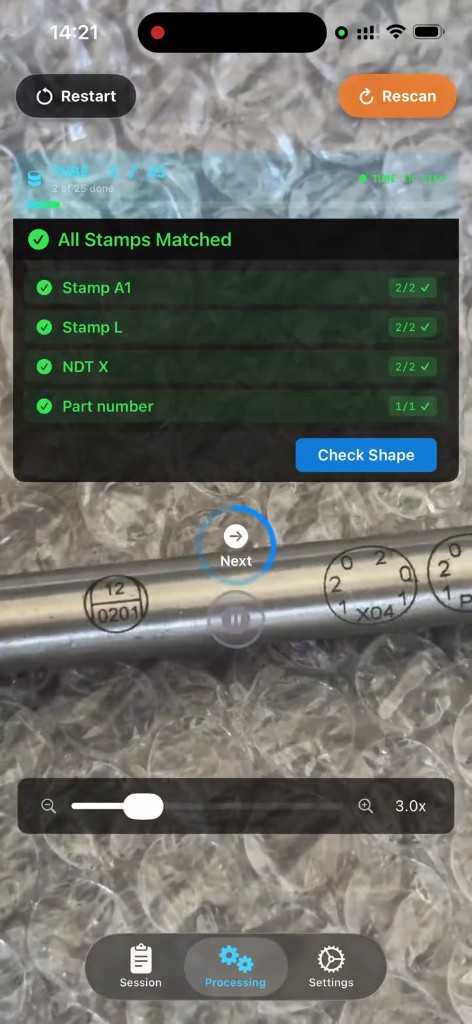
Marking and labeling inspection is typically performed at a fixed station. Parts are brought to the operator in batches. The system reads and validates each marking against the production documentation, and the operator generates a report once the batch is complete.
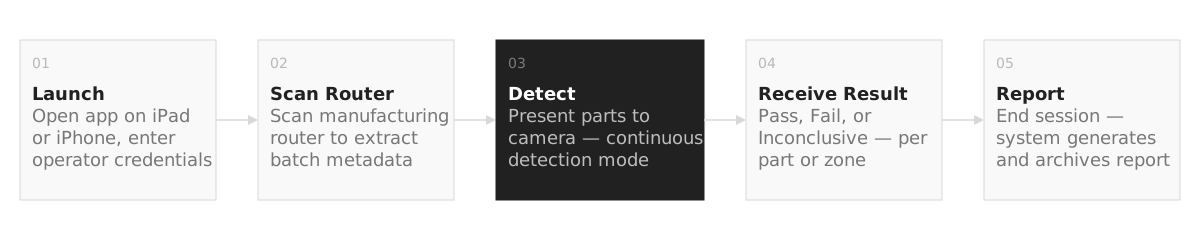 Figure 1 — Inspection workflow: marking and labeling use case
Workflow
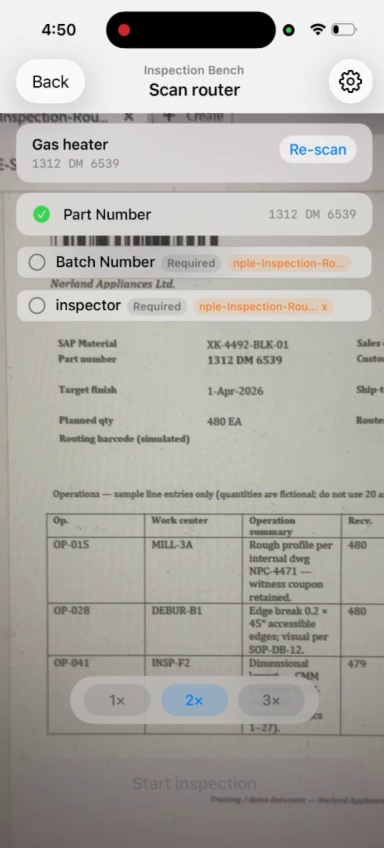
- Launch the app, enter operator credentials
- Scan the manufacturing router to extract batch metadata
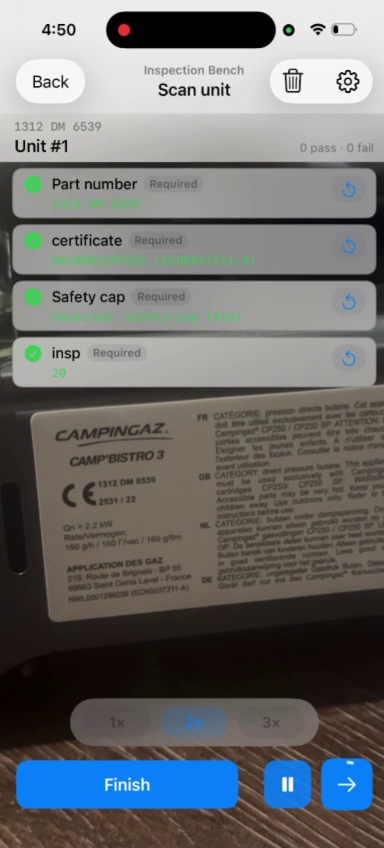
- Present parts to the camera one at a time — continuous detection mode
- Receive a result per part: Pass, Fail, or Inconclusive
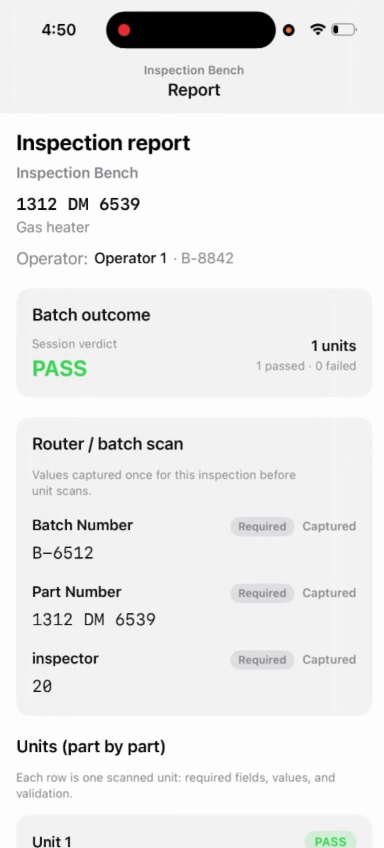
- End session — system generates and archives the summary report
Inspection scope
- Presence / absence confirmation
- Text verification against reference value
- Multi-field validation per part type
- Legibility check
- Color coding verification
Performance
| Metric | Value |
|---|---|
| Min. character height | 3 mm |
| Part size range | 2″ – 8′ |
| Min. detectable feature | 5 mm |
| Time per marking zone | < 5 s |
| Working distance | 4″ – 36″ |
| Recommended lighting | 800 lux |
Use Case 2 — Assembly Completeness
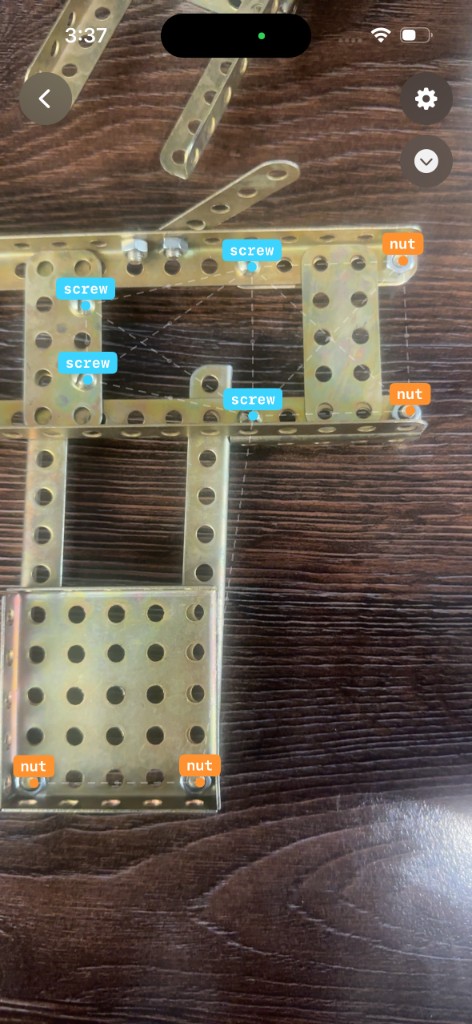
Assembly inspection is a mobile process. The operator moves to the assembly, identifies it by scanning a QR code, and follows a predetermined inspection plan, capturing images to tile the full build. The system checks each zone for missing components, misplacement, orientation errors, and foreign objects.
Workflow
- Launch the app, enter operator credentials
- Identify assembly by scanning a QR code, sticker, or entering an ID
- Follow the inspection plan, capturing images zone by zone
- Receive a result per inspection point: Pass, Fail, or Inconclusive
- Flag identified errors, end session and generate the report
Detection modes
- Component presence or absence
- Misplacement or orientation errors
- Extra or foreign component detection
- Fasteners, brackets, connectors, tubing
- Wiring harnesses, panels, seals, labels
Performance
| Metric | Value |
|---|---|
| Positional accuracy | ±10 mm |
| Rotational accuracy | ±5° |
| Assembly size range | 20″ – 13′ |
| Min. detectable component | 5 mm |
| Capture zone per tile | ~20″ × 36″ |
| Max tiles per assembly | 100 |
IT Architecture
INVENTOR is composed of three components, designed for offline-first operation, on-premise deployment, and zero reliance on external cloud infrastructure.
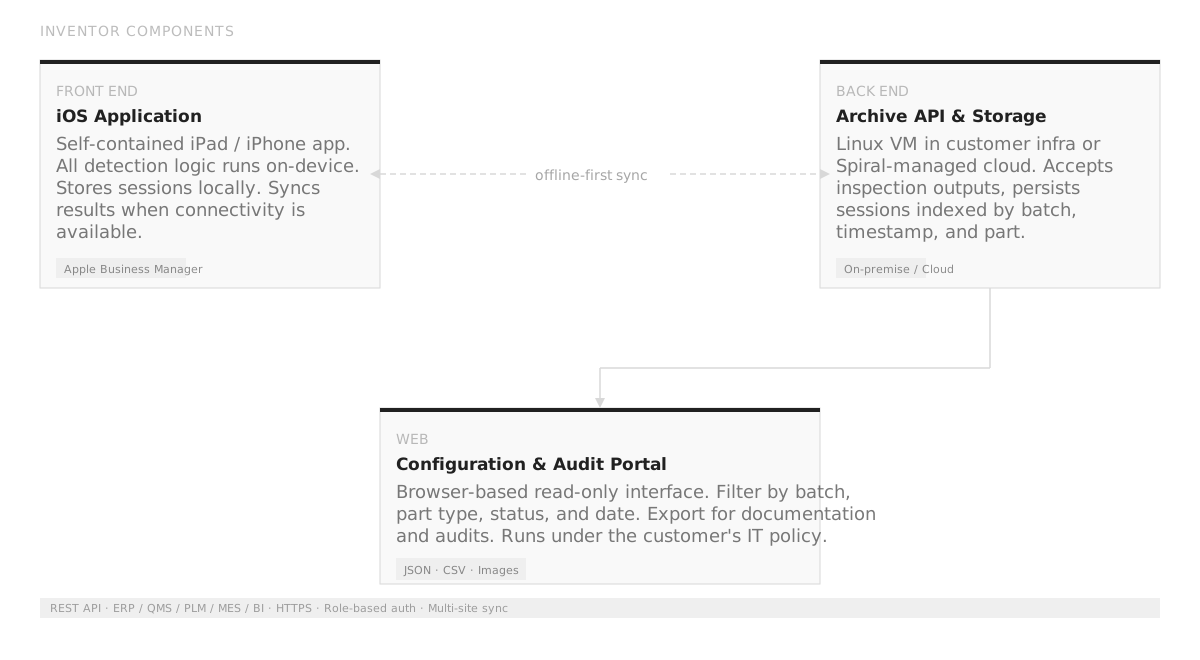 Figure 2 — INVENTOR system components and data flow
iOS Application (Front End)
Self-contained iPad/iPhone app with all detection and validation logic running on-device. Stores sessions locally and syncs results to the backend when connectivity is available. Distributed via Apple Business Manager.
Archive API & Storage (Back End)
Ingestion and storage service running on a Linux VM within the customer’s infrastructure or on Spiral-managed cloud. Accepts structured inspection outputs from the mobile app, persists sessions indexed by batch, timestamp, and part.
Configuration & Audit Portal (Web)
Browser-based read-only interface for reviewing archived inspection sessions. Supports filtering by batch, part type, status, and date, with export for documentation and audits.
Integration
Connects with ERP, QMS, PLM, MES, and BI platforms through REST API. Supports role-based authentication, HTTPS, and multi-site synchronization. Export formats: JSON, CSV, and image packages with metadata.
Technology
INVENTOR employs a layered cascade of computer vision models that work in sequence to validate each part or assembly. All inference runs on-device, ensuring offline capability and low latency.
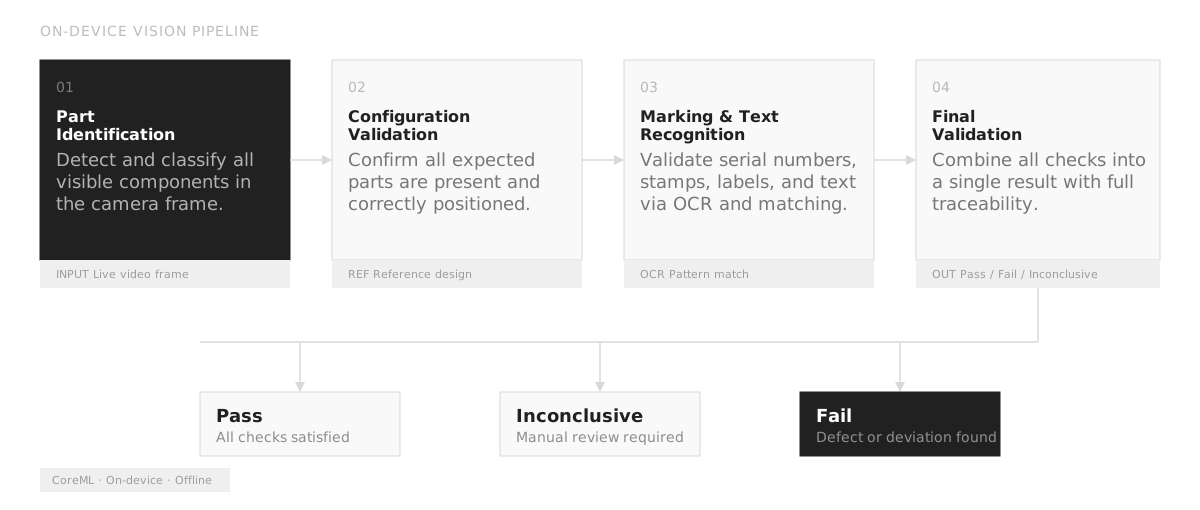 Figure 3 — Vision model cascade: on-device inference pipeline
- Part identification — Detect and classify all visible components in the camera frame.
- Configuration validation — Confirm that all expected parts are present and correctly positioned relative to the reference design.
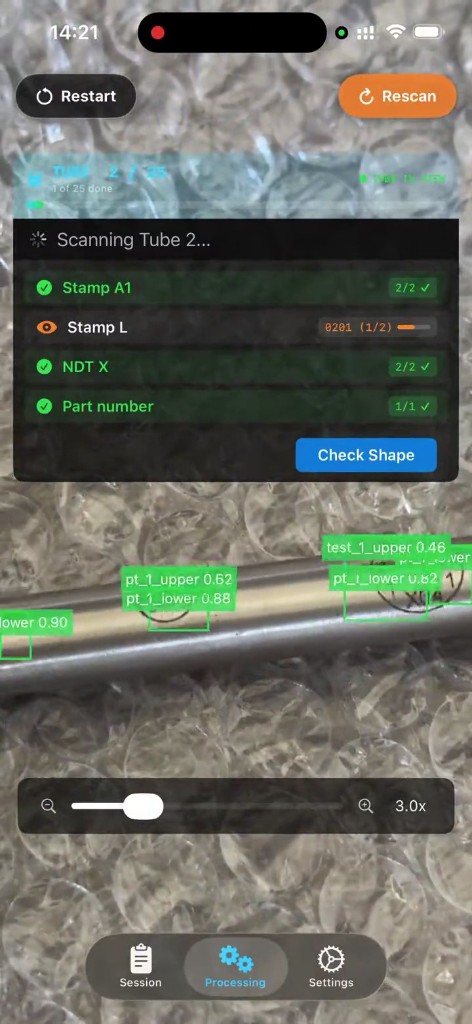
- Marking & text recognition — Validate serial numbers, stamps, printed labels, and other textual markings using OCR and pattern matching.
- Final validation — Combine all checks into a single inspection result with full traceability, producing a pass / fail / inconclusive outcome.
Models are trained on customer-specific data collected during the setup phase and converted to CoreML for on-device execution on iOS. Updates are delivered as app updates through Apple Business Manager, requiring no changes to backend infrastructure.
System Setup
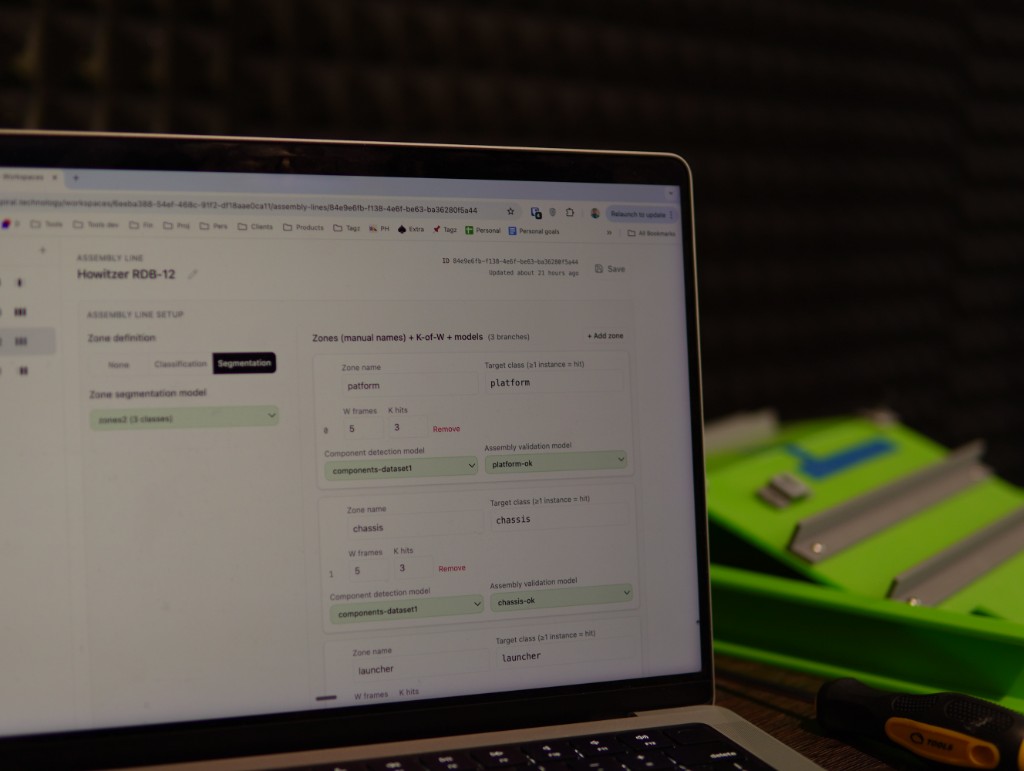
Deploying INVENTOR for a new customer or use case follows a defined process. With timely involvement from the customer’s quality and IT teams, the first use case is typically operational within one week.
Deployment steps
- Collect visual samples of the parts or assemblies to be inspected
- Define pass and failure modes with the customer’s quality team
- Configure the inspection workflow: router fields, part types, accuracy thresholds
- Deploy devices to the shop floor
- Conduct operator training
- Acceptance testing to confirm detection accuracy and workflow integration
Configuration speed
| Scope | Duration |
|---|---|
| New scenario, existing part | 5 – 30 min |
| New part, existing config | 3 – 4 hours |
| New assembly or part family | ~24 hours |
| Custom scenario or module | ~1 week |
Where INVENTOR Fits
Performs best
- Production with frequent part changes and rapid changeovers
- Large or complex assemblies not suited for fixed inspection stations
- Confined environments such as airframes or machinery interiors
- Inspections during maintenance without workflow interruption
Not the right fit
- Fully automated or robotic lines
- High-throughput production requiring millisecond cycle times
- Inspections requiring non-visual modalities (X-ray, ultrasonic)
- Sub-millimeter parts better served by optical comparators
Benefits
| Adaptable | Mobile. Runs on iPhones and iPads the operator carries to the work. Inspections happen at the point of production: at the table, on the assembly, inside the airframe. |
| Fast to configure | New pass/fail scenarios can be live in as little as 30 minutes. The system reconfigures in hours where traditional machine vision takes weeks. |
| Consistent | Applies the same digital criteria across all inspectors and shifts. Eliminates variability in inspection disposition — every operator reaches the same pass/fail decision on the same finding. |
| Immediate | Real-time feedback at the point of inspection, enabling faster correction and reducing rework. |
| Traceable | Every inspection automatically logged and timestamped with images, supporting ISO 9001 and AS9100 record-keeping requirements. |
| Integrates everywhere | Connects with ERP, QMS, PLM, MES, and BI platforms through REST API with role-based authentication and multi-site synchronization. |
Next steps
Ready to bring Inventor to your shop floor?
The first use case is typically operational within one week. Get in touch to discuss your inspection requirements.
Company Profile

Spiral Science and Technology Inc
Spiral is a computer vision and augmented reality company headquartered in Boston, Massachusetts. Alumni of the 2020 AFWERX U.S. Air Force technology accelerator powered by Techstars in Boston, Spiral develops mobile-based inspection systems for manufacturing.
The team operates across the United States, Europe, and India, serving customers in aerospace and defense, wind energy, industrial piping, and marine equipment manufacturing.
Contact
Kosta Shyshkin
Director Americas
k@spiral.technology k@spiral.technology +1 617 341-81-40 +1 617 341-81-40
Bhuvaneshwar BN
Solutions Engineer
bb@spiral.technology bb@spiral.technology +91 97393 40122 +91 97393 40122
Address
12 Channel Street, Boston MA 02210
SAM / UEID
X6W7RH56SJB3
CAGE
9DVV7
Selected Customers






All rights reserved 2018–2026
Product snapshots